The client for this project is an email delivery company. The company provides a transactional email API for platforms that send mail on behalf of many customers. A mentor at the company is reviewing the work. The mentor wrote the company’s JavaScript SDK.
The problem
A JavaScript developer deploying an application on Vercel who wants to send email through the client’s service currently has to leave Vercel to do it. They create an account with the client, generate an API key, paste that key into the Vercel project’s environment variables by hand, and then configure DNS on the sending domain before any mail will go out. Each of those steps is a place where setup stalls.
Vercel already has an Integrations Marketplace for this kind of connection. A developer installs an integration, picks a project, and the service writes the credentials the project needs. A competitor already ships an integration of that kind. The client does not. The project is to build one.
What the first version will do
The first version is deliberately small. A Vercel user installs the integration on a personal account or a team, selects a project they are allowed to configure, and supplies an API key they already have. The integration stores that key on the project so the application can use it in production, preview, and development. The user can replace the key or remove it from a configuration page.
The first version does not create an account with the client, does not generate a key, and does not send email. It also does not configure DNS. Those are later work. The point of this version is to remove the copy-and-paste step, and to do that without holding the rest of the project up on features that need a deeper connection to a client account.
A later version could provision accounts and sit in the Marketplace as a subscribable product. That depends on a commercial relationship with Vercel, which is outside this project’s control, so it is not part of the success criteria.
How the pieces fit
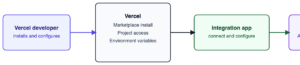
Four parties are involved. The developer installs the integration from Vercel. Vercel handles the install and exposes the selected project. A small integration application, which is the part this project builds, receives that authorization and writes the API key into the project. The key then lives with the Vercel project, where the developer’s application can read it.
1) Vercel Developer (Installs and configures).
2) Vercel (Marketplace Install, Project Access, Environmental Variables).
3) Integration Loop (Connect and Configure).
4) Vercel Project (API Key, Stored for You)
Development model
The project will use an iterative model, in two-week sprints. A waterfall model was considered and set aside. Waterfall fits a target that is already stable. This one is not. The useful shape of the first version depends on how Vercel’s install flow behaves in practice, and on which parts of a later account connection the client actually wants. Freezing a design before those are known would mean rebuilding it.
Three things make short cycles a better fit here.
The riskiest unknown is the platform, not the page the user sees. Connecting an install to a Vercel project, and writing a credential into that project, is the part that can surprise the rest of the plan. That work comes first, so a wrong assumption shows up in week 3 rather than in week 12.
The mentor can review the work directly, and wrote the SDK this integration sits next to. A sprint that ends with something that can be run is more useful than a large delivery at the end of the course.
The course asks for the same shape. Reports are due at the ends of weeks 2, 4, 5, 6, and 15, and the course ends with a demonstration. An increment that can be shown at the end of a sprint serves both.
The process stays small, because there is one developer. There will not be standups or story points. What will be kept is a numbered requirements list, so later reports can point at a stable target, and a public record of progress on this blog. Each sprint is planned after the previous one has been reviewed.
A hybrid that froze the reports and iterated only on the code was also considered. It was rejected. The requirements, analysis, and design reports are milestones inside the same schedule. They will be written carefully, and revised if the platform disagrees with them.
Plan
| Week | Work |
|---|---|
| 1 | Project selected. First contact with the client is complete. |
| 1–2 | Set up the repository and toolchain. This report. |
| End of 2 | Software development model selected. Initial plan complete. |
| 3–4 | Install flow: a developer can connect Vercel and reach a configuration page. |
| End of 4 | Requirements report. |
| 5 | Analysis report. |
| 5–6 | Select a project and store the API key on it. |
| End of 6 | Design report. |
| 7–8 | Replace and remove the key. Clear messages when Vercel is unavailable. |
| 9–10 | Tests for the main path, without live credentials. |
| 11–12 | Setup notes and a README another person could follow. |
| End of 13 | First version complete. |
| 13–15 | Final report and the client demonstration. |
| End of 15 | Project report, presentation, and demonstration. |
Risks
The native Marketplace product may not be available in time. It is already outside the graded scope, so that does not change the plan.
Vercel’s install flow may not match the documentation. The install work is the first sprint for that reason.
A public listing needs a logo, a support contact, and a legal owner from the client. The first version can be finished and demonstrated without being publicly listed. Listing is a client decision.
If other courses take a week or two, the later polish goes before the install and key-storage path. The course guide allows 30 weeks.