- Introduction
Pet Adopt is a cross-platform mobile application developed to support animal associations and pet lovers by simplifying and centralizing the pet adoption process. Many shelters currently rely on manual coordination or social media platforms to manage pet listings, adoption communication, and event announcements. These approaches are often inefficient, difficult to track, and time-consuming for volunteers and staff.
The goal of this project is to design and implement a dedicated mobile solution that allows users to browse pets, view detailed profiles, save favorites, post new listings, and communicate directly with pet owners or the association. By combining these features into one application, the system improves organization, accessibility, and user engagement while reducing administrative overhead.
This report consolidates all previous project documentation and presents the complete implementation, testing, and usage information for the final system.
- Development Model
An Agile and iterative development model was selected for this project. Instead of building the system in one large phase, development was divided into short, manageable sprints. Each sprint focused on implementing a small set of features, testing them, and refining the application based on feedback.
Project progress was managed using:
- Jira for task tracking and sprint planning
- GitHub for version control and collaboration
This approach provided flexibility and allowed continuous improvement. Core features such as authentication, browsing pets, and posting listings were implemented first, followed by enhancements such as favorites and real-time chat.
- Requirements Summary
This section summarizes the key functional and non-functional requirements that guided the design and implementation of the Pet Adopt mobile application. These requirements were identified based on the needs of animal associations and pet adopters, with the goal of providing a simple, secure, and efficient mobile platform for managing pet adoption activities.
Functional Requirements
Functional requirements describe the specific features and behaviors that the system must provide to users.
User Authentication
- Users must be able to create an account and log in using a secure authentication method.
- Users must be able to log out at any time.
- Only authenticated users can access protected features such as posting pets, saving favorites, and chatting.
Pet Browsing and Discovery
- Users can browse a list of pets available for adoption on the Home screen.
- Users can view pets organized by categories such as species or type.
- Users can filter or navigate listings to quickly find relevant pets.
Pet Details
- Users can view detailed information for each pet, including images, age, breed, description, and owner information.
- The system displays clear and readable pet profiles to help users make informed adoption decisions.
Favorites Management
- Users can save pets to a personal favorites list.
- Users can remove pets from favorites.
- Favorites are stored per user for quick future access.
Posting and Managing Listings
- Authenticated users can create new pet listings by submitting details and uploading images.
- Users can view and manage their own listings through a “My Posts” section.
- Users can delete listings when pets are adopted or unavailable.
Communication (Chat-Based Adoption)
- Users can send and receive messages through an integrated chat system.
- Chat allows direct communication between adopters and pet owners or the association.
- Adoption coordination is handled through this messaging system rather than a separate request workflow.
Events and Announcements
- Users can view announcements or events organized by the animal association when provided.
Non-Functional Requirements
Non-functional requirements define the quality attributes and constraints of the system.
Usability
- The application must provide a simple, intuitive, and easy-to-navigate interface.
- Users should be able to complete common tasks (browsing, posting, messaging) with minimal steps.
Security
- Authentication must protect user accounts and restrict access to authorized features.
- Sensitive data should not be publicly exposed.
- Access control must prevent unauthorized modifications to listings.
Performance
- Pet listings and images should load quickly.
- Chat messages should appear in near real time.
- The application should remain responsive during normal use.
Scalability
- The system should support growth in the number of users, pet listings, and messages without performance degradation.
- The cloud backend must handle increasing data volume efficiently.
Reliability
- The application should operate consistently without crashes or data loss.
- Errors should be handled gracefully with clear feedback to users.
Maintainability
- The codebase must be organized and modular to allow future updates and feature additions.
- Components should be reusable and easy to modify.
Compatibility
- The app must function on Android devices and optionally support iOS through Expo.
This set of requirements provided the foundation for the system’s analysis, design, and implementation decisions and ensured that the final application addressed both user needs and technical constraints.
- Analysis
Several implementation approaches and tools were evaluated before development began.
The Waterfall model was considered but rejected because it is rigid and less adaptable to changing requirements. Since user interface improvements and feature adjustments were expected during development, a flexible methodology was required.
The Agile model was selected because it supports incremental delivery, continuous feedback, and easier adaptation to changes.
Technology choices included:
- React Native with Expo for cross-platform mobile development
- Firebase for backend services
- Clerk for authentication
These tools were chosen for their scalability, ease of integration, and suitability for modern mobile applications.
- System Architecture and Database Design
The Pet Adopt application follows a client–cloud architecture that separates the mobile user interface from backend services responsible for authentication, data storage, and media management. This design improves scalability, maintainability, and security by ensuring that the mobile client focuses only on presentation and interaction logic while cloud services handle persistence and access control.
At a high level, the system operates as follows:
- The React Native (Expo) mobile client manages screens, navigation, and user interactions.
- Clerk Authentication handles user sign-in, session management, and secure identity verification.
- Firebase Firestore stores all structured application data.
- Firebase Storage stores uploaded images and returns URLs used in pet listings.
This separation of concerns keeps the application lightweight on the device while allowing the backend to scale independently as the number of users and listings increases.
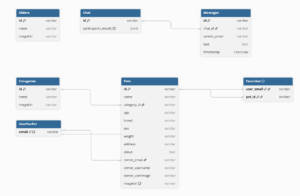
Firestore Database Structure
Firebase Firestore is used as the primary database because it provides fast read/write operations, flexible document-based storage, and near real-time updates, which are especially important for chat functionality. Data is organized into collections, with each collection responsible for a specific type of information.
The main collections include:
- Categories – stores pet categories and icons displayed on the Home screen
- Sliders – stores banner or promotional images shown at the top of the Home feed
- Pets – stores all pet listings, including details such as name, age, breed, description, owner information, and image URLs
- Chat – stores conversations and messages between users and pet owners or the association
- UserFavPet – stores each user’s list of favorite pet IDs for quick retrieval
Images uploaded when creating a pet listing are stored in Firebase Storage, and the generated image URLs are saved inside the corresponding pet document in Firestore. This avoids storing large media files directly in the database and improves performance.
Although Firestore is a non-relational database, logical relationships are maintained through references such as pet IDs and user identifiers. For example, the favorites collection references pets, and chat messages reference participating users. This approach keeps the data organized while maintaining flexibility.
Design Benefits
This architecture provides several advantages:
- Scalability – cloud services can support growth in users and data
- Security – authentication and permissions are handled by Clerk and Firebase rules
- Performance – quick database queries and efficient image loading
- Maintainability – modular structure separates UI, logic, and data layers
- Extensibility – new features can be added without major redesign
Overall, the combined system and database design ensures that the Pet Adopt application remains reliable, efficient, and easy to evolve as future requirements are introduced.
- Implementation and Code Documentation
The system follows a client–cloud architecture:
- Mobile app → user interface & navigation
- Clerk → authentication
- Firebase Firestore → database
- Firebase Storage → images
This separation keeps the UI simple while cloud services handle data and security.
This design keeps the system modular: UI screens focus on presentation, while backend services handle persistence and secure access.
Technology Stack
Frontend
- React Native
- Expo
- Expo Router (file-based routing)
- JavaScript / TypeScript
Backend / Cloud
- Firebase Firestore (database)
- Firebase Storage (media)
- Clerk (authentication)
Tools
- Node.js
- npm
- Expo CLI
How to Run the App Locally
Prerequisites
- Node.js installed
- Expo installed
- Expo Go (mobile) or emulator
Download Source Code
To download the source code, navigate to https://github.com/Abdelmouzahir/pet-adopt-app-Capstone , click on ‘Code’ and click ‘Download ZIP’. Extract this ZIP folder to a convenient location and open it to the root folder.
Run commands

Then:
- press i → iOS simulator
- press a → Android emulator
- or scan QR code with Expo Go
The -c clears cache to prevent build errors.
Folder Structure
“`
├── 📁 Shared
│ └── 📄 Shared.jsx
├── 📁 app
│ ├── 📁 (tabs)
│ │ ├── 📄 _layout.jsx
│ │ ├── 📄 favorite.jsx
│ │ ├── 📄 home.jsx
│ │ ├── 📄 inbox.jsx
│ │ └── 📄 profile.jsx
│ ├── 📁 add-new-pet
│ │ ├── 📄 SelectField.jsx
│ │ └── 📄 index.jsx
│ ├── 📁 chat
│ │ └── 📄 index.jsx
│ ├── 📁 login
│ │ └── 📄 index.jsx
│ ├── 📁 pet-details
│ │ └── 📄 index.jsx
│ ├── 📁 user-post
│ │ └── 📄 index.jsx
│ ├── 📄 _layout.jsx
│ └── 📄 index.jsx
├── 📁 assets
│ ├── 📁 fonts
│ │ ├── 📄 Outfit-Bold.ttf
│ │ ├── 📄 Outfit-Medium.ttf
│ │ └── 📄 Outfit-Regular.ttf
│ └── 📁 images
│ ├── 🖼️ bone.png
│ ├── 🖼️ calendar.png
│ ├── 🖼️ icon.png
│ ├── 🖼️ login.png
│ ├── 🖼️ placeholder.png
│ ├── 🖼️ sex.png
│ └── 🖼️ weight.png
├── 📁 components
│ ├── 📁 Home
│ │ ├── 📄 Category.jsx
│ │ ├── 📄 Header.jsx
│ │ ├── 📄 PetListByCategory.jsx
│ │ ├── 📄 PetListItem.jsx
│ │ └── 📄 Slider.jsx
│ ├── 📁 Inbox
│ │ └── 📄 UserItem.jsx
│ ├── 📁 PetDetails
│ │ ├── 📄 AboutPet.jsx
│ │ ├── 📄 OwnerInfo.jsx
│ │ ├── 📄 PetInfo.jsx
│ │ ├── 📄 PetInfoCard.jsx
│ │ └── 📄 PetSubInfo.jsx
│ └── 📄 MarkFav.jsx
├── 📁 config
│ └── 📄 FirebaseConfig.js
├── 📁 constants
│ └── 📄 Colors.ts
├── ⚙️ .gitignore
├── 📝 README.md
├── ⚙️ app.json
├── 📄 eslint.config.js
├── ⚙️ package-lock.json
├── ⚙️ package.json
└── ⚙️ tsconfig.json
Folder Structure Explanation
- Root
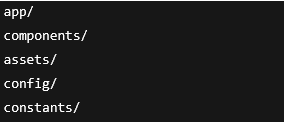
Each folder has a single responsibility for better maintainability.
- app/ (Screens + Routing)
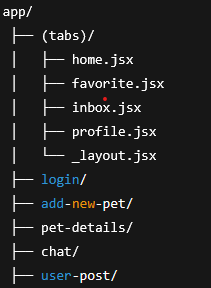
Responsibilities
- Tabs → main navigation
- Login → authentication
- Home → browse pets
- Pet Details → view pet information
- Chat → messaging
- Add New Pet → create listing
- My Post → manage listing
Components/
This folder contains reusable UI building blocks that are shared across multiple screens, such as pet cards, category buttons, sliders, chat message bubbles, and favorite icons. Using reusable components improves code reuse, keeps screens cleaner, simplifies updates, and makes the app easier to scale as new features are added.
Assets/
The Assets folder stores all static resources used in the app, including icons, fonts, images, and illustrations. Keeping these files organized in one place ensures consistent visuals and makes it easier to manage and update design resources.
Config/
The Config folder contains the Firebase configuration file (FirebaseConfig.js), which initializes the Firebase app and connects the project to Firestore and Firebase Storage. This setup allows the app to securely communicate with backend services.
Constants/
This folder stores shared values such as colors, themes, and styling constants. Centralizing these settings ensures a consistent design throughout the app and allows global visual changes to be made quickly.
Backend Services
Authentication – Clerk
Clerk handles all user authentication features, including login, logout, sessions, and user identity management. Only logged-in users can post pets, favorite listings, chat, or manage their posts, which removes the need to build custom security logic.
Firestore Database
Firestore is used to store application data such as pets, categories, favorites, chats, and sliders. It provides fast queries, scalable storage, and real-time updates, which are especially important for features like live chat.
Firebase Storage
Firebase Storage manages uploaded pet images. When a user uploads a photo, the image is stored in the cloud, a URL is generated, and that URL is saved in Firestore so the image can be displayed inside the app.
Data Flow Summary
Browse
Home → fetch pets → Firestore → render cards
View details
Select pet → details screen → show info + favorite + chat
Favorite
Tap heart → save petId → UserFavPet
Add post
Form → upload image → Storage → save data → Firestore
Adoption
Handled through chat communication between users and owners (no separate adoption request system).
User → open pet → open chat → communicate with owner
Design Principles Used
The app follows several key design principles to ensure long-term quality and maintainability. It uses modular components to promote code reuse and consistency across screens, while maintaining a clear separation between UI and data logic to improve readability and testing. A cloud-managed backend with Firebase and Clerk handles authentication, storage, and real-time data efficiently without requiring custom servers. File-based routing with Expo Router keeps navigation simple and organized, and the overall scalable structure allows new features and screens to be added easily. Together, these principles make the app easier to maintain, test, and extend as it grows.
- Test Plan
Test Approach
Testing was performed using:
- manual functional testing
- user interaction testing
- edge case validation
- basic error handling checks
Focus areas:
- navigation
- CRUD operations
- Authentication
- chat
- form validation
Test Environment
- Expo Go (Android device)
- iOS simulator
- Android emulator
- Firebase cloud backend
| ID | Feature | Action | Expected Result |
| T1 | Login | Sign in | User enters app |
| T2 | Browse | Open Home | Pets display correctly |
| T3 | Category filter | Select category | Only that category shown |
| T4 | Details | Open pet | Pet info loads |
| T5 | Favorite | Tap heart | Saved to favorites |
| T6 | Favorites | Open tab | Favorited pets shown |
| T7 | Add Post | Submit form | Pet saved to database |
| T8 | Image upload | Upload photo | Displays correctly |
| T9 | My Posts | Delete post | Post removed |
| T10 | Inbox | Open chat | Messages load |
| T11 | Chat | Send message | Message appears instantly |
| T12 | Empty states | No data | Friendly message shown |
| T13 | Validation | Missing fields | Error shown |
| T14 | Logout | Tap logout | Session cleared |
All critical features worked as expected.
- Manuals and Guides
- User Manual – Adopters
Login / Get Started
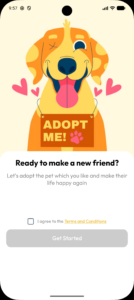
When users open the app, they see a friendly welcome screen with a short message and an illustration. After agreeing to the terms and conditions, they tap “Get Started” to log in or create an account and access the app securely.
Browse Pets
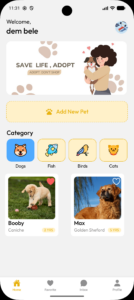
When users open the app, they are taken directly to the home screen where available pet listings are displayed in a clear and organized layout. From there, they can easily browse through the pets and use category filters to narrow down results based on their preferences, making it simple and quick to find specific types of pets.
View Details, Save Favorites, and Contact Owner
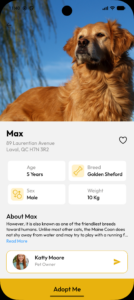
Users can tap on a pet card to view detailed information such as age, breed, weight, and description. They can save a pet by tapping the heart icon, which adds it to the Favorites tab for quick access later. If interested, users can start a chat with the owner, send messages, and arrange the adoption directly through the conversation.
Profile & Account Management
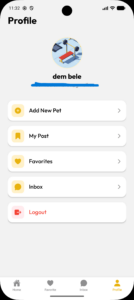
Users can access their profile to view personal information and manage their activity. From this screen, they can add a new pet, view their posts, check saved favorites, open their inbox for chats, or log out of the app, providing quick and easy control over their account.
Add New Pet
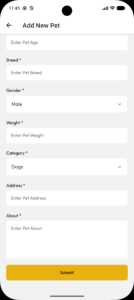
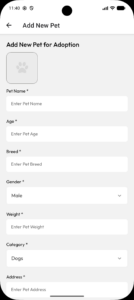
Users can add a new pet for adoption by completing a simple form with details such as name, age, breed, gender, weight, category, address, description, and an image. After filling in the required information, they tap “Submit” to upload the pet and make it available for others to view and adopt.
Inbox & Chat

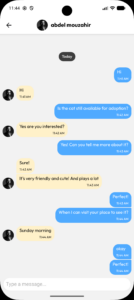
Users can view all their conversations in the inbox and open any chat to message pet owners or adopters in real time. Through the chat, they can ask questions, share details, and arrange adoption directly, making communication simple and convenient within the app.
Admin/Data Guide (Firestore)
To manage app content, categories can be added in Firestore under the Category collection by creating a new document with fields such as name and imageUrl. Sliders are added the same way under the Sliders collection, using name and imageUrl to display featured images in the app. Pet images are uploaded automatically to Firebase Storage (inside the pet images folder), and their download URLs are saved in Firestore for display. Favorites are stored in the UserFavPet collection, where each document includes the user’s email and a list of pet IDs representing the pets they saved.
- Project Postmortem
Difficulties and Challenges
One of the main challenges in this project was working with a modern mobile development stack that included React Native, Expo, Firebase services, and Clerk authentication. While these tools provide powerful functionality, integrating them required time to understand configuration, asynchronous data handling, and service interactions. Coordinating authentication, database operations, and image uploads introduced complexity, particularly when ensuring secure access and consistent data updates.
Implementing real-time chat and organizing the application structure also required careful planning. As the project grew, some early design decisions needed refactoring to improve navigation, component reuse, and maintainability. Additionally, testing across different devices and environments occasionally produced inconsistencies that required extra debugging.
Learnings
Despite these challenges, the project provided significant learning opportunities. I gained practical experience building a complete cross-platform mobile application, integrating cloud services, and structuring a scalable codebase. I improved my understanding of system architecture, database design, and real-time features, while also strengthening skills in Agile development, version control, and technical documentation.
These experiences increased my confidence in developing full-stack mobile applications and delivering a complete solution from planning to deployment.
Outcomes and Reflection
The final application successfully meets the project goals by providing a simple and effective platform for browsing pets, posting listings, saving favorites, and communicating through chat. The system is modular, maintainable, and scalable, demonstrating both technical implementation skills and sound software engineering practices. Overall, the project represents a complete development lifecycle and a practical real-world solution for managing pet adoption activities.