Design Report
Pet Adopt Mobile Application
- Overall System Design
The Pet Adopt application is designed as a cross-platform mobile app built with React Native (Expo). The app follows a client–backend architecture where the mobile client handles user interaction, navigation, and UI rendering, while cloud services handle authentication, data storage, and media storage.
At a high level, the system works as follows:
- The mobile app (client) displays screens such as login, home feed, pet details, favorites, inbox/chat, profile, and add-post.
- Clerk Authentication manages sign-in/sign-out and user sessions.
- Firebase (Firestore) stores structured application data such as pet listings, user profiles, favorites, and chat metadata/messages.
- Firebase Storage stores uploaded pet images and returns URLs used in pet listings.
- The app reads/writes data through controlled service functions (e.g., fetch pets, add favorite, create post, send message) to keep the UI separate from the data layer.
This design keeps the system modular: UI screens focus on presentation, while backend services handle persistence and secure access.
- Major Components in the System
2.1 Mobile Client Components (React Native / Expo)
Navigation Layer
- Bottom tab navigation connects major areas: Home, Favorites, Inbox/Chat, and Profile.
- Stack navigation supports moving from Home → Pet Details → Chat.
UI Screens (Presentation Layer)
- Login Screen
- Home Feed Screen (pet listings + categories)
- Pet Details Screen
- Favorites Screen
- Inbox Screen (conversation list)
- Chat Screen (messages)
- Profile Screen (account actions)
- Add Post Screen (create new pet listing)
- My Posts Screen (manage personal listings)
State and Data Handling
- The client uses local state to handle UI interactions (filters, selected pet, form inputs).
- Data fetching and updates are handled through service/helper functions that communicate with Firebase.
2.2 Authentication Component (Clerk)
Responsibilities
- Handles login and session management.
- Provides a secure identity for each user.
- Controls access to protected features such as:
- Adding a post
- Chatting
- Managing favorites
- Viewing “My Posts”
This reduces complexity in the application by offloading secure authentication logic to a dedicated service.
2.3 Backend Data Component
Responsibilities
- Stores app data in collections such as:
- Users
- Pets (listings)
- Favorites
- Chats / Conversations
- Messages
- Supports real-time or near real-time updates (especially for chat).
- Allows the app to query and display pets, events (if included), and user activity.
Firestore is used because it fits well with a mobile application that needs quick reads/writes and scalable storage.
2.4 Media Storage Component (Firebase Storage)
Responsibilities
- Stores uploaded images for pet listings.
- Returns image URLs that are saved in Firestore as part of a pet listing.
- Enables fast display of pet images in the Home feed and Details screen.
2.5 Admin / Post Management Component
Depending on permissions, the system supports managing content such as:
- Creating and deleting pet posts
- Marking pets as adopted/unavailable
- Viewing “My Posts” for easier content control
This component ensures pet listings remain up-to-date and accurate.
- Screen Mockups and Screen Flow
This section summarizes the system UI based on the mockups you created (Figures 1–4).
3.1 Authentication and Entry Flow
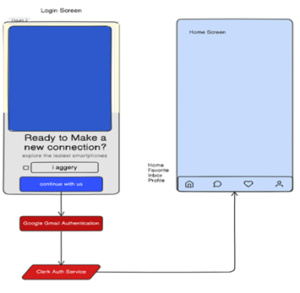
Login Screen → Authentication → Home
- The user starts on the Login Screen.
- Authentication is performed through Clerk, using a supported sign-in method.
- After successful login, the user is navigated to the Home Screen.
- Bottom navigation provides access to: Home, Favorites, Inbox, and Profile.
Purpose
- Simple entry point
- Secure login before accessing protected features
3.2 Home Screen Layout
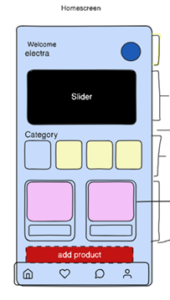
Home Screen
- Displays a welcome area and a slider/banner.
- Shows pet categories and pet cards (listings).
- Includes an Add Post button for users/admins allowed to post.
- Data displayed on this screen is retrieved from Firestore.
Purpose
- Main discovery experience for adopters
- Quick browsing and navigation to pet details
3.3 Pet Details, Favorites, and Chat Flow
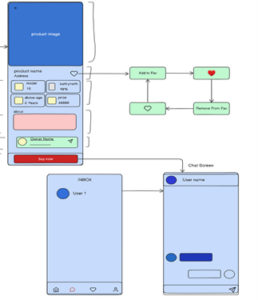
Pet Details Screen
- Displays pet image, key pet attributes, description/about section, and owner/association info.
- Includes a favorite (heart) action:
- Add to favorites
- Remove from favorites
- Includes a path to messaging:
- From pet details, user can open chat with the owner/association.
Inbox → Chat Screen
- Inbox screen shows conversation list.
- Chat screen shows message history and input area for sending messages.
Purpose
- Help users make informed adoption decisions
- Enable direct communication for questions and adoption arrangements
3.4 Add Post, Profile, My Posts, and Favorites
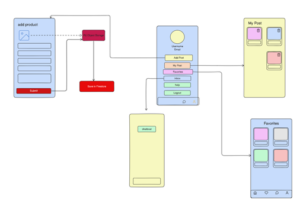
Add Post Screen
- User uploads an image and fills in pet listing fields.
- Image is uploaded to Firebase Storage.
- Listing data is saved to Firestore.
Profile Screen
- Displays user info (username/email).
- Provides navigation actions: Add Post, My Posts, Favorites, Inbox, Help, Logout.
My Posts Screen
- Displays posts created by the current user/admin.
- Supports basic management actions such as delete (and optionally edit).
Favorites Screen
- Displays saved pets for quick access later.
Purpose
- Support content creation and management
- Provide user control and quick access to key features
- Database Design
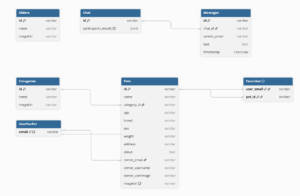
The Pet Adopt application uses Firebase Firestore as its primary database. Firestore stores data in collections and documents, which provides a flexible and scalable structure suitable for a mobile application. Each collection is responsible for a specific type of data to keep the system organized and easy to maintain.
The main collections include:
- Categories – stores pet categories and icons displayed on the Home screen.
- Sliders – stores banner images used in the Home screen slider.
- Pets – stores all pet listings and their details (name, age, breed, description, owner info, and image URL). This is the core dataset of the system.
- Chat – stores conversations and messages between users and the association.
- UserFavPet – stores each user’s list of favorite pet IDs for quick retrieval.
Relationships between collections are handled through references such as pet IDs, user emails, and image URLs stored in Firebase Storage.
Pet Adopt Database schema diagrams.
- Summary
The Pet Adopt system design follows a modular client–backend architecture built with React Native (Expo), Clerk authentication, and Firebase services. The mobile client handles navigation and user interaction, Clerk manages secure authentication, and Firebase provides cloud storage for application data and images. Firestore organizes data into collections such as pets, categories, chat, and favorites, enabling efficient queries and scalable storage. Together, these components support the main user flows of login, browsing pets, viewing details, saving favorites, chatting, and managing posts.